
Quick answer
Best-fit shortcutIf your reps already work in Salesforce, the best field sales route optimization software usually keeps route planning, event creation, and field execution in the same workflow. That is where Tourvia is strongest. If your team mainly needs dispatch or technician scheduling, a field service tool is usually a better fit. For the broader buyer view, start with the main Salesforce route planning page.
Tourvia in 4 clear answers
A premium field workflow story starts with clarity: what it is, who it helps, how it is bought, and why teams actually adopt it.
What is it?
Tourvia is Salesforce-native route optimization software built for field sales teams that need planning and execution inside the CRM.
Who is it for?
For teams that want lower travel time, better visit density, and operational visibility without leaving Salesforce.
How much does it cost?
€30/user/month excluding tax, billed annually in that standard scope.
What is the main benefit?
Faster route planning, lower travel time, and one-click Salesforce Event creation from the optimized route.
What buyers usually want to confirm
For this kind of page, the buying decision usually turns on three things: proof the workflow is real, confidence the rollout stays inside Salesforce, and a cost story that does not explode with headcount.
“Easy to install, quick to onboard, and well documented.”
Useful public proof that rollout friction is lower than buyers expect for a field product.
The field sales routing challenge
Field sales teams face a daily puzzle: which accounts to visit, in what order, considering travel time, working hours, customer availability and business priorities. This is fundamentally a Vehicle Routing Problem (VRP), one of the most studied optimization challenges in operations research.
Most field reps solve this puzzle manually, using experience and intuition. While experienced reps develop good instincts, manual planning has inherent limitations:
- Time-consuming: Planning the next day's visits typically takes 30-45 minutes each morning
- Suboptimal sequences: Humans struggle to find the best visiting order when more than 5-6 stops are involved
- No constraint handling: Factoring in lunch breaks, time windows, visit durations and return-to-base constraints simultaneously is extremely difficult mentally
- Static plans: Manual plans don't adapt easily when a meeting is cancelled or a new priority appears mid-day
Manual planning vs. algorithm optimization
How most field reps plan today
- Open Salesforce, check which accounts need a visit
- Open Google Maps in another tab
- Manually enter each address
- Try different orderings to minimize drive time
- Go back to Salesforce, create events for each visit
- Enter account, contact, time and address for each event
This process takes significant time and produces results that are far from optimal, especially for routes with more than a handful of stops.
How algorithm-powered optimization works
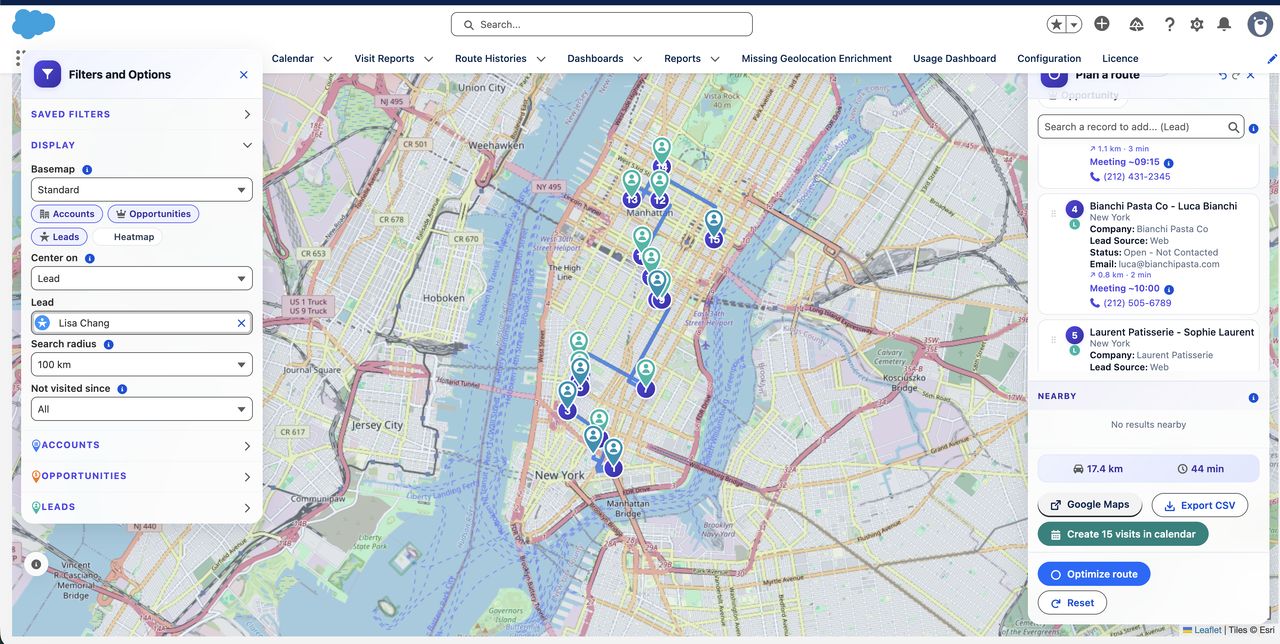
- Select accounts to visit on an interactive map (inside Salesforce)
- Set constraints: start time, end time, lunch break, visit duration
- Click "Optimize route": the algorithm calculates the best sequence
- Review the optimized route on the map
- Click "Create events": all Salesforce events are created in one click
The entire process takes minutes instead of 30-45 minutes, and the resulting route is mathematically optimized.
Decision snapshot
If you are evaluating right nowWhat usually triggers a switch
Field sales teams rarely buy route optimization just because routing exists. They switch when manual planning starts wasting rep time, coverage gets inconsistent, or the buying story of per-user tools gets harder to defend as the team expands.
How route optimization works
Tourvia uses VROOM, an open-source Vehicle Routing Problem (VRP) solver. VROOM is specifically designed for real-world routing problems and handles:
- GPS coordinates: Each Salesforce account's Latitude/Longitude (geocoded in Salesforce)
- Time windows: Start time, end time, appointment slots
- Service duration: How long each visit takes
- Break constraints: Lunch break timing and duration
- Travel time matrix: Realistic driving times between all points
The routing engine itself is powered by OpenRouteService (ORS), another open-source project. ORS provides the travel time and distance matrices that VROOM needs to solve the optimization problem.
Both VROOM and ORS run on Tourvia's own high-performance infrastructure hosted in France (OVH Gravelines). This means:
- No dependency on Google Maps or any paid third-party service
- No per-calculation charges
- Worldwide coverage, from Europe to Asia, Africa, Americas and Oceania
- EU-hosted routing infrastructure for organizations that care about data residency
Why CRM integration matters
Route optimization in isolation, without CRM integration, solves only half the problem. The real value comes from connecting route planning with your customer data.
CRM-aware filtering
Before planning a route, filter accounts by any Salesforce field: last visit date, account type, revenue, territory, owner. This ensures you're visiting the right accounts, not just the nearest ones.
Automatic event creation
The biggest time saver is creating Salesforce Events in bulk. After optimizing a route, one click creates all calendar events with the correct account, contact, time slot and address. No manual data entry.
Visit history and coverage analysis
When route data lives in Salesforce, managers can build reports and dashboards showing: which accounts were visited, how often, which territories are under-covered, and how field time is allocated.
Permission-aware access
A native Salesforce route planner respects your org's security model. Reps see only the accounts they have access to. Sharing rules, profiles and field-level security all apply.
Mobile optimization for the field
Field sales reps work on smartphones and tablets, not desktop computers. A route optimization tool must work well on mobile to be useful in the field.
Key mobile capabilities
- Responsive interface: Map and controls adapt to smaller screens with a bottom-sheet panel design
- GPS geolocation: Tap a button to see all Salesforce accounts within a configurable radius around your current position
- Navigation handoff: Send the optimized route to Google Maps or Waze for turn-by-turn navigation
- Works in Salesforce Mobile: Teams can use it inside the Salesforce mobile environment instead of rolling out a separate field sales app
Nearby accounts: the impromptu visit feature
One of the most valuable field features is finding nearby accounts. When a meeting finishes early or gets cancelled, reps can instantly see which Salesforce accounts are nearby and add a spontaneous visit to their day.
Field service route optimization vs field sales
The terms "field service route optimization" and "field sales route optimization" often appear interchangeably, but they describe different workflows with different priorities.
Field service: technicians, SLAs, and emergency dispatch
Field service teams send technicians to customer sites for installation, maintenance, or repair. Their scheduling is driven by service-level agreements (SLAs), equipment availability, and skill-based assignment. A broken HVAC unit in July cannot wait until Thursday because the route looks better that day. Dispatchers need to handle emergency calls mid-day, reassign jobs when a technician runs late, and track parts inventory per van.
Dedicated field service platforms like ServiceTitan and WorkWave are built for exactly this. They include dispatch boards, work order management, parts tracking, and customer self-service portals. If your team's primary job is reactive maintenance with strict SLA windows, those tools are worth evaluating.
Field sales: account visits, relationships, and territory coverage
Field sales teams visit prospects and existing customers to build relationships, close deals, and ensure account coverage across a territory. Their planning is driven by pipeline value, visit frequency targets, and geographic density. A rep might need to visit 8 accounts in Lyon this week, prioritized by deal stage and days since last contact. There is rarely an emergency dispatch scenario.
When one tool can serve both
Some organizations have hybrid teams. A medical device company might send the same rep to both sell new equipment and check on installed units. A building materials distributor might combine sales calls with delivery coordination. If these teams already use Salesforce as their system of record, a single route optimization tool inside the CRM can handle both visit types. Tourvia works for any Salesforce account-based visit planning, whether the visit is a sales call, a service check, or a delivery confirmation. The key requirement is that the accounts and contacts live in Salesforce.
What route optimization saves field teams
Route optimization is easy to justify financially because the savings are measurable from week one. Here are the numbers that field sales managers typically see after deploying optimization software.
Drive time reduction: 20-30%
Industry benchmarks consistently show that algorithm-optimized routes reduce total driving time by 20% to 30% compared to manually planned routes. For a rep who drives 3 hours per day, that means 36 to 54 minutes back in the schedule, every day.
Extra visits: 2-4 per rep per week
The time saved on driving converts directly into additional customer visits. Most teams report 2 to 4 extra visits per rep per week after switching to optimized routing. Over a quarter, that is 26 to 52 additional customer touchpoints per rep.
Morning planning: 30-45 minutes saved daily
Manual route planning typically consumes 30 to 45 minutes each morning. With optimization software, planning drops to under 5 minutes: select accounts, click optimize, click create events. That is roughly 2 to 3 hours per week returned to selling time.
Fuel and vehicle costs
A field rep driving 30,000 km per year who reduces mileage by 20% saves 6,000 km annually. At an average cost of €0.30 per km (fuel, wear, insurance), that is €1,800 saved per rep per year. For a team of 10 reps, the annual saving is €18,000 on vehicle costs alone.
Faster ramp-up for new reps
New hires no longer need months to "learn the territory" through trial and error. The optimization tool shows them where to go and in what order from day one. Territory knowledge shifts from the rep's memory to the system, reducing ramp-up time and protecting the company when experienced reps leave.
A simple way to pressure-test the ROI
The exact result depends on territory density and current planning discipline, but buyers usually only need one credible scenario to see whether the category pays for itself.
| Example, 10-rep team | Conservative impact | Why buyers care |
|---|---|---|
| Planning time | 30 to 45 minutes saved per rep per day | That is 25 to 37.5 rep-hours returned each week across the team. |
| Extra visits | 2 to 4 extra visits per rep per week | That is 20 to 40 additional customer touchpoints per week for the team. |
| Vehicle cost reduction | Around €18,000 per year if mileage drops 20% | The standard Tourvia scope is €3,600 for 10 users per year per licensed user, so mileage savings alone can already justify the category. |
Then add the revenue upside from better visit density. That is why the cleanest buying motion is often: install first, test on real accounts, then pressure-test the economics with your own field model.
The Tourvia approach
Tourvia is a 100% native Salesforce application (managed package 2GP) that brings route optimization directly into your Salesforce org.
That matters because route planning alone is rarely enough. Teams also need a rollout story, admin clarity, and field execution that stays attached to CRM context.
What makes it different
- Native Salesforce: Lightning Web Component running inside your org, not an external tool with a Salesforce connector
- Per-user pricing: €30/user/month billed annually at €360/user/year per licensed user. Larger enterprise deployments can be quoted separately when needed.
- Self-hosted routing: Own infrastructure in France using open-source algorithms. No Google Maps dependency.
- Worldwide coverage: Route calculations work globally: Europe, Africa, Asia, Americas, Oceania
- Multi-language: Interface available in French, English and Spanish
- EU-hosted routing infrastructure: Route calculations run on infrastructure hosted in France, which supports EU data residency goals
Built for Salesforce field teams
Tourvia is for organizations that already use Salesforce and need route optimization with predictable costs and €30/user/month.
Getting started
- Request a 30-day trial via the contact form. Validate fit inside your Salesforce org first
- Configuration: Managed package installed in your org, filters and permissions set up
- Training: Your team trained and autonomous (documentation included)
- Subscribe to continue: Activate broader route optimization and field execution capabilities
Average timeline: 1 to 2 weeks from first validation to production rollout.
Setup options: self-setup or fully managed setup at €3,000 excluding tax (includes training and 30-day follow-up).
Who should shortlist Tourvia, and who should not
This page converts better when it qualifies the reader honestly. Tourvia is strong for Salesforce-led field sales teams. It is not pretending to be a technician dispatch platform.
Frequently asked questions
Tourvia handles typical field sales routes effectively. The VROOM algorithm is designed for real-world Vehicle Routing Problems and can process multi-stop routes efficiently.
Yes. Tourvia provides worldwide coverage: Europe, Africa, Middle East, Asia, Americas and Oceania. All calculations run on Tourvia's own infrastructure, with no geographic restrictions.
Yes. Tourvia is designed to work in the Salesforce mobile experience and in mobile browsers. Depending on your setup, teams can access GPS geolocation, nearby accounts, and navigation handoff to Google Maps or Waze.
Tourvia works with the standard Account object (with Contact sub-queries). It creates standard Salesforce Events for scheduled visits. No custom objects are required for basic usage.
Field service optimization focuses on technician dispatch, SLA compliance, emergency rescheduling, and parts tracking. Sales route optimization focuses on account coverage, visit frequency, territory planning, and pipeline-driven prioritization. Both benefit from algorithmic routing, but the scheduling constraints and business rules differ. Tools like ServiceTitan and WorkWave specialize in field service dispatch, while Tourvia is built for Salesforce-based sales and hybrid teams.
Typical ROI depends on team density, travel patterns, and current planning discipline. Many teams justify the cost through time saved in planning, better visit coverage, and lower mileage, but the real payback should be validated against your own field model.
What usually closes the decision on this page
Late-page summaryReady to optimize your field sales routes?
Request a 30-day trial, validate the workflow on your own Salesforce data, then decide whether the paid route-optimization scope earns the rollout.