
Tourvia in 4 clear answers
The point is not just to calculate routes. It is to make route planning easier to adopt, easier to justify internally, and easier to operationalize inside Salesforce.
What is it?
Tourvia is native Salesforce route planning and route optimization software for field teams.
Who is it for?
For sales and field teams that manage accounts in Salesforce and want faster planning without an external tool.
How much does it cost?
Start with a 30-day trial (every feature included), then €30/user/month excluding tax per licensed user to keep full access. Larger enterprise deployments can be quoted separately when needed.
Where is data processed?
CRM data stays in Salesforce. Route calculations use only the data required for routing, within a documented framework.
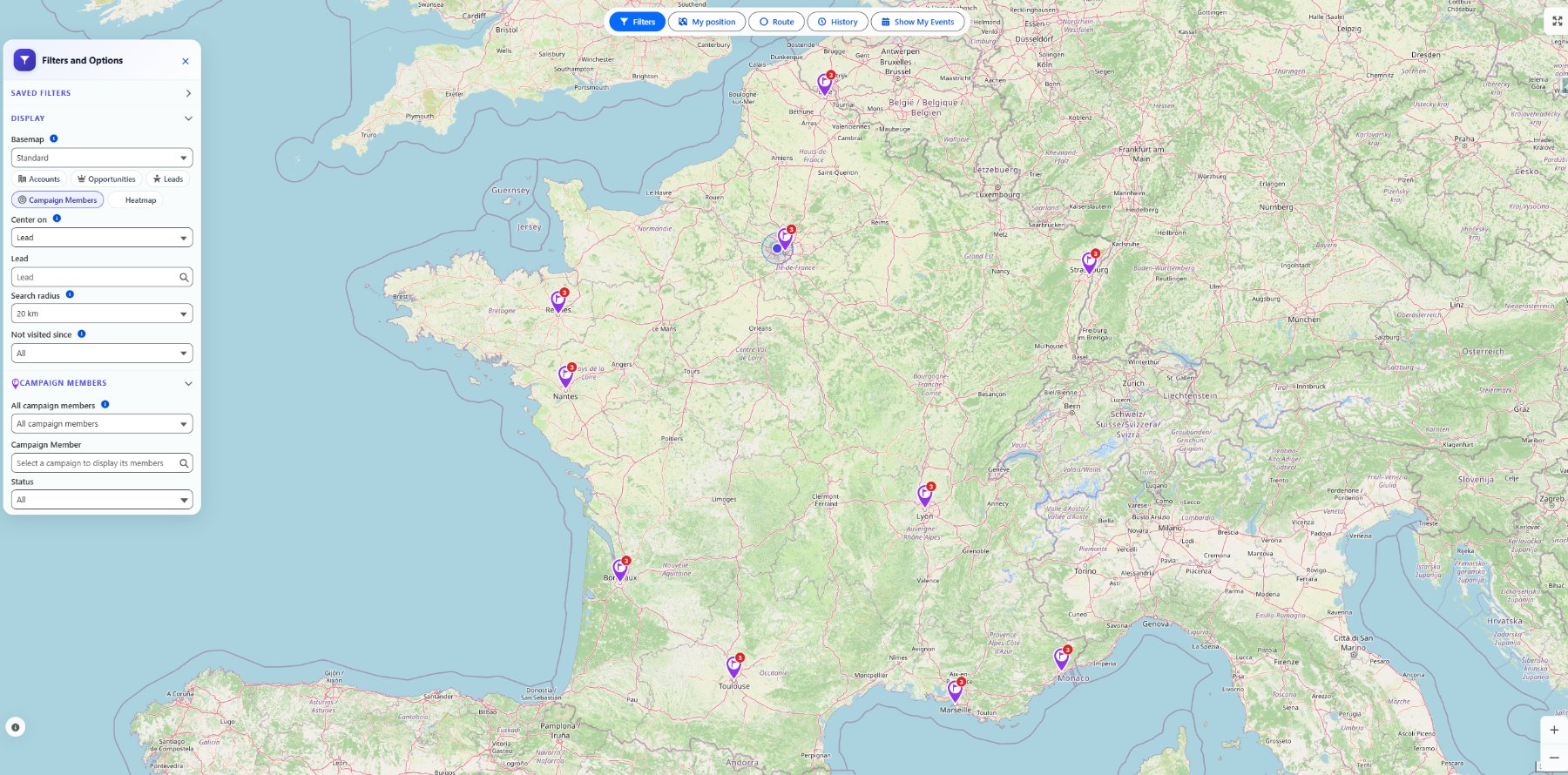
This matters because buyers can see the workflow inside Salesforce immediately, not just read a claim about native route planning. Click to expand.
Campaign Members now appear on the Tourvia map
Marketing and field teams can map Campaign Members from Salesforce Campaigns, whether the member is a Lead or a Contact. Users can open the map from a Campaign record page, or choose a target campaign from the global Tourvia workspace.
Decision shortcuts
Jump closer to the buying pathIf you searched “route planner for Salesforce” or “sales route planner Salesforce”, use this shortcut
High-intent pathThe fastest buying path is not a long shortlist. It is checking three things in order: can the workflow stay native to Salesforce, can the team validate it during the 30-day trial, and does pricing still make sense once more reps need access.
What buyers can verify fast
The sales story lands better when proof is visible early: native package fit, public review signal, and a buying model that is easier to defend internally.
“Great native routing experience inside Salesforce.”
Strong public signal around native workflow fit, map usability, and in-CRM execution.
What is Salesforce route planning?
Salesforce route planning means organizing field visits directly in Salesforce instead of switching between spreadsheets, mapping tools, and the CRM.
For teams already using Salesforce as their source of truth, native route planning keeps account data, schedules, and optimized routes in one place. Reps see accounts on a map, select the ones to visit, and generate an efficient route without leaving Salesforce. If you are evaluating options, see our guide to choosing a sales route planner.
Salesforce route planning and route planning for Salesforce are the same buying intent
Some buyers start with the platform name first, others with the workflow first. In practice, both searches usually mean the same thing: a route planning workflow that stays tied to Salesforce records, Events, reporting, and rollout logic.
Why plan routes natively inside Salesforce?
Many field teams still plan their day with Google Maps, spreadsheets, or standalone route planners. The real problem is not route calculation itself. It is the break with CRM data.
- Data duplication: addresses move in and out of Salesforce
- No CRM context: external tools ignore account priority, owner, or last visit date
- Manual follow-up: reps still create Salesforce Events stop by stop
- Weak visibility: managers cannot see planned field coverage directly in Salesforce
Native planning keeps accounts, route decisions, and activity tracking in one workflow. For more on this topic, see the Salesforce Maps alternatives comparison.
Key capabilities of a Salesforce route planner
Interactive map with account visualization
Display Salesforce accounts on a dynamic map with smart clustering and custom color coding.
Route optimization
Generate a more efficient visit sequence instead of relying on manual ordering.
Automatic Salesforce Event creation
After optimization, one click creates the planned Salesforce Events with the right account, contact, time slot, and address.
Smart filters
Filter records by territory, last visit date, account type, owner, potential, or any Salesforce field before building a route.
GPS-based nearby accounts
When a rep has a gap in the day, GPS geolocation shows nearby Salesforce accounts inside a configurable radius.
Want to understand how these capabilities compare across vendors? See the Salesforce Maps pricing breakdown and our sales route planner comparison guide.
Comparison: route planning tools for Salesforce
Several tools address Salesforce route planning. The table below compares Tourvia with three well-known alternatives across the criteria that matter most for field teams. For a deeper look at pricing specifically, see the Salesforce Maps pricing breakdown.
For a full side-by-side review, see what teams should compare before choosing a sales route planner. If you are comparing against Salesforce Maps specifically, also read what to compare before replacing Salesforce Maps.
How to choose a route planner for Salesforce
Not every route planning tool fits every Salesforce org. Before committing, evaluate these five criteria.
1. Native vs external integration
A native Salesforce app (managed package) runs inside your org. Accounts, events, permissions, and reporting stay tied to the same CRM model. External tools usually add a separate login, data synchronization, and more integration overhead. If your team already lives in Salesforce, the Salesforce Maps alternatives comparison is the best place to benchmark the trade-offs.
2. Pricing model and total cost
Per-user pricing makes sense for very small teams but scales poorly. A team of 15 reps paying $50/user/month spends $9,000/year. With per-user pricing, the cost stays the same whether you have 5 or 20 users. Always calculate the 12-month total cost, including setup fees. The Salesforce Maps pricing breakdown shows how per-user costs can compound.
3. Deployment complexity
Some tools take weeks to deploy with professional services. Others install in minutes from AppExchange. Ask how long it takes to reach a working state, whether your admins can configure it alone, and whether you need consulting support or can self-serve.
4. Field execution, not just planning
Route planning is only half the job. The tool should also support visit execution: creating Salesforce Events, logging check-ins, capturing visit notes, and feeding data back into reports. If reps have to switch between apps to complete a visit, adoption drops.
5. Reporting and visibility for managers
Managers need to see planned routes, actual visits completed, and territory coverage. If the tool keeps this data outside Salesforce, building reports usually requires more integration work. Native tools write directly to Salesforce objects, so standard reporting and dashboards are easier to keep aligned.
How Tourvia handles route planning
Tourvia is a native Salesforce managed package that installs directly in your org. It is built for teams that want route planning, event creation, and field execution in one place.
- Your CRM data stays in Salesforce
- Only the data required for routing is used for calculations
- No dependency on Google Maps to make the product work
- Worldwide route coverage with predictable fixed pricing
Built for production use
For Salesforce orgs that need route planning with predictable costs and fewer moving parts than a separate field tool.
Who benefits from Salesforce route planning?
The best fit is not every field team. It is the team that already runs customer-facing work from Salesforce and feels the cost of planning friction every week.
Need help scoping the rollout for your team? Learn about Tourvia consulting and setup services.
Pricing: per-user pricing
Most Salesforce route planning tools charge per user. Tourvia uses a simpler buying path: request a 30-day trial, then subscribe to keep full access only when the workflow is worth scaling.
→ Read the detailed comparison: per-user pricing
→ See how visit planning works inside Salesforce
→ See how Tourvia works everywhere in Salesforce
Why switch from a seat-based mapping tool when route planning is the real need
Official Salesforce Maps pricing currently starts at $75/user/month billed annually, with the advanced tier at $125/user/month. That can still make sense for broader geo-analytics programs, but many field teams are really buying route planning and visit execution inside Salesforce, not the whole geo stack.
Deployment and getting started
- Request trial: validate the workflow inside your Salesforce org first
- Configuration: managed package installation, filters, roles and permissions
- Training: documentation included, your team becomes autonomous
- Move to the subscription if needed: extend into deeper route optimization and field execution
Average timeline from first validation to go-live: 1 to 2 weeks, depending on your context.
→ Follow the setup guide
→ Review standard pricing and larger-deployment quoting
Who should shortlist Tourvia for Salesforce route planning
The strongest buying story is not “works for everyone.” It is “fits Salesforce-led field teams that want route planning and execution in one place.”
Frequently asked questions about Salesforce route planning
For Salesforce-led sales teams, the best sales route planner is usually the one that stays native to Salesforce, lets admins validate fit through a 30-day trial, and keeps pricing simple as more reps need access. Tourvia is built for that path, with 30-day trial request and standard pricing at €30/user/month excluding tax, billed annually.
No. Salesforce does not provide route planning in the standard platform. Tourvia adds these capabilities as a native managed package.
Yes. You can request a 30-day trial via the contact form. Private AppExchange access can be coordinated for qualified Salesforce orgs before moving to paid route optimization.
Standard pricing is €30/user/month excluding tax per licensed user. Larger enterprise deployments can be quoted separately when needed based on scope.
Your CRM data stays in Salesforce. Route calculations use only the data required for routing, within a documented framework.
Yes. Tourvia is designed to work within the Salesforce environment, including Salesforce mobile workflows used by field reps during visit execution.
Tourvia uses a route optimization engine that considers GPS coordinates, time constraints, and visit durations to calculate a more efficient visit order.
The subscription includes route calculations, hosting, Salesforce compatibility updates, technical support, and new features. Standard pricing covers Salesforce orgs per licensed user.
If you are still deciding, close the page with these 3 checks
Late-page summaryReady to launch route planning inside Salesforce?
Request a 30-day trial first, then subscribe to keep advanced route optimization for your field team.
From the blog
- Salesforce Maps pricing breakdown: what it really costs →
- Sales route planner: what teams should compare before they buy →
- Salesforce Maps alternatives compared for field teams →
- Salesforce route planning software: what field teams should look for →
- Route planning in Salesforce: why field teams want it inside the CRM →